Posts

Updating all Look Up Column Values with Single Method in Share Point Programmatically

1. Consider we want to update two look up columns like Country and State in Share Point List itemUpdate["CountryLookup"] = GetLookFieldIDS("InterColumnName", "ValuetoUpdateinlistitem", "ListName", SiteWebObject); public static SPFieldLookupValueCollection GetLookFieldIDS(String coloumnIntName, String lookupValues, String lookupSourceList, SPWeb web) { SPFieldLookupValueCollection lookupIds = new SPFieldLookupValueCollection(); if (!String.IsNullOrEmpty(lookupValues)) { SPList lookupList = web.Lists[lookupSourceList]; SPQuery query = new Microsoft.SharePoint.SPQuery(); query.Query = String.Format("<Where><Eq><FieldRef Name='{0}'/><Value Type='Text'>{1}</Value></Eq></Where>", coloumnIntName, lookupValues); SPListItemCollection listItems = lookupList.GetItems(query); foreach(Microsoft.SharePoint.SPListItem item in listItems) { SPFieldLookupVa...
Declaring and Reading the SharePoint People Picker Values Programmatically.

Declaring the Sharepoint Custom People Picker and Reading the Value. 1. Copy and Paste the below code in your form to create the Sharepoint Custom People Picker Control in Visual Web part design page. <SharePoint:PeopleEditor ID="pplEditor" CssClass="ms-long ms-spellcheck-true" runat="server" Rows="1" MultiSelect="false" PlaceButtonsUnderEntityEditor="false" Width="500" SelectionSet="User" /> 2. Make it " true " the MultiSelect Option, if you want to select the Multiple Users from the Picker. 3. Use the below code snippet to Read the Value from the People Picker. SPFieldUserValue userValues=new SPFieldUserValue(); userValues = GetSPUserValue(web, pplEditor); Method used to Get the People Picker Values  /*People Picker Control*/         public SPFieldUserValue GetSPUserValue(SPWeb objSPWeb, PeopleEditor pplEditor)         {             try             ...

REST API to check login user groups

/*  Check Current user Permission Level or User Group */ function getCurrentUserReviewerAndApprover() {      var currentUserRole = "";     jQuery.ajax     ({         url: _spPageContextInfo.webAbsoluteUrl + " /_api/web/GetUserById(" + _spPageContextInfo.userId + ")/Groups ",         method : "GET",         async : false,         headers : { "Accept": "application/json; odata=verbose" },         success : function (data) {             var results = data.d.results;             var isVisitor =  false ;             var isMember=  false ;             var isOwener=  false ;             //var groupInfo = jQuery.grep(results, function (group) {       ...

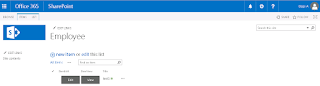
Creating Edit and View Buttons in SharePoint 2013 List View using JS Links

Image
JS Links Intro in SharePoint 2013 Client-side rendering is a new concept in SharePoint 2013. It’s provides you with a mechanism that allow you to use your own output render for a set of controls that are hosted in a SharePoint page ( list views, display, add and Edit forms ). This mechanism enables you to use well-known technologies, such as HTML and JavaScript, to define the rendering logic of custom and predefined field types. JSLink files have the ability to quickly and easily change how a list views and forms are rendered. More specifically how the fields in that list should be displayed. Note:  I wrote those code samples to be easy to understand and to achieve learning purposes, because of that I avoided using complex code and controls. In the same time I tried to present real world examples as much as possible. Creating Edit and View Buttons in SharePoint 2013 List View First we want to create a list. For eg: I am creating the Employee as a custom List. Fist ...

Reading XML tag Values using Programmatically

Get the XML tag values  1. Create Constants.xml file and create the tags in the below format. <?xml version="1.0" encoding="utf-8" ?> <ConstantsXML>   //This is used as identifier to read the data from inside of the identified tag from Code <Constants> <EmpName> Employee Name </EmpName> <EmployeeID> Employee Id </EmployeeID> <EmpDepartment> Department </EmpDepartment> </Constants> </ConstantsXML> 2. Declaring the Variables   #region Members         static String elementValue;         private static readonly String ConstantNodeIdentifier = "ConstantsXML";         private static XDocument m_sourceDocument;   #endregion 3. Method to Read the XML Document form the Specified Path static Constant()         {             try           ...

Updating Excel data to Share Point List Items based on Id

Loading Excel Data  public void LoadExcelData()         {             string fileName = "D:/Employee.xlsx";                     string fileExtension = Path.GetExtension(fileName).ToUpper();             string connectionString = "";             if (fileExtension == ".XLS")             {                 connectionString = "Provider=Microsoft.Jet.OLEDB.4.0;Data Source='" + fileName + "'; Extended Properties='Excel 8.0;HDR=YES;'";             }             else if (fileExtension == ".XLSX")             {                 connectionString = "Provider=Microsoft.ACE.OLEDB.12.0;Data Source='" + fileName + "';Extended Prop...

Deleting Share Point list Items using powershell.

Add-PSSnapin Microsoft.SharePoint.PowerShell -erroraction SilentlyContinue try {      $web = Get-SPWeb "http:/Testurl/sites/Feedback/"    $list = $web.Lists["Survey"]    $caml='<Where><Eq><FieldRef Name="Month" /><Value Type="Text">June</Value></Eq></Where>' $query=new-object Microsoft.SharePoint.SPQuery $query.Query=$caml $col=$list.GetItems($query) Write-Host $col.Count $col | % {$list.GetItemById($_.Id).Delete()} $web.Dispose() } catch { write-host $_.exception } Hope... This code will help you...